What should a IT Support Engineer resume include?
An IT support resume should include a short profile, a skills section with operating systems, Microsoft 365, Active Directory, networking basics and ticketing tools, experience bullets with ticket volumes, response targets and user counts, certifications such as CompTIA A+, and education. Build it on FixDoks and keep it to one page.
IT Support Engineer Resume at a glance
| Design | Classic, ATS-friendly |
|---|---|
| Sample | PDF and Word download |
| Examples | 14 bullet points, 22 skills |
| Processing | On our server over HTTPS; files are deleted right after conversion |
| Max file size | 50 MB per file |
| Price | Free to use, no watermark |
| Download | First download free, then ₹49 for 2 months of unlimited downloads (US$3 outside India) |
| Files at once | 1 free, up to 30 with a plan |
| Works on | Chrome, Edge, Safari and Firefox on Windows, Mac, Android and iPhone |
How to use IT Support Engineer Resume Template
- Click Use this template to open the builder with the Classic design and a IT Support Engineer section order, or Edit this example to start from the sample.
- Fill in your details. Use Examples and Skills by job for ready-made lines, or the AI writer for your own notes.
- Check the resume score, paste the job ad to see missing keywords, then download your PDF.
IT Support Engineer resume sample
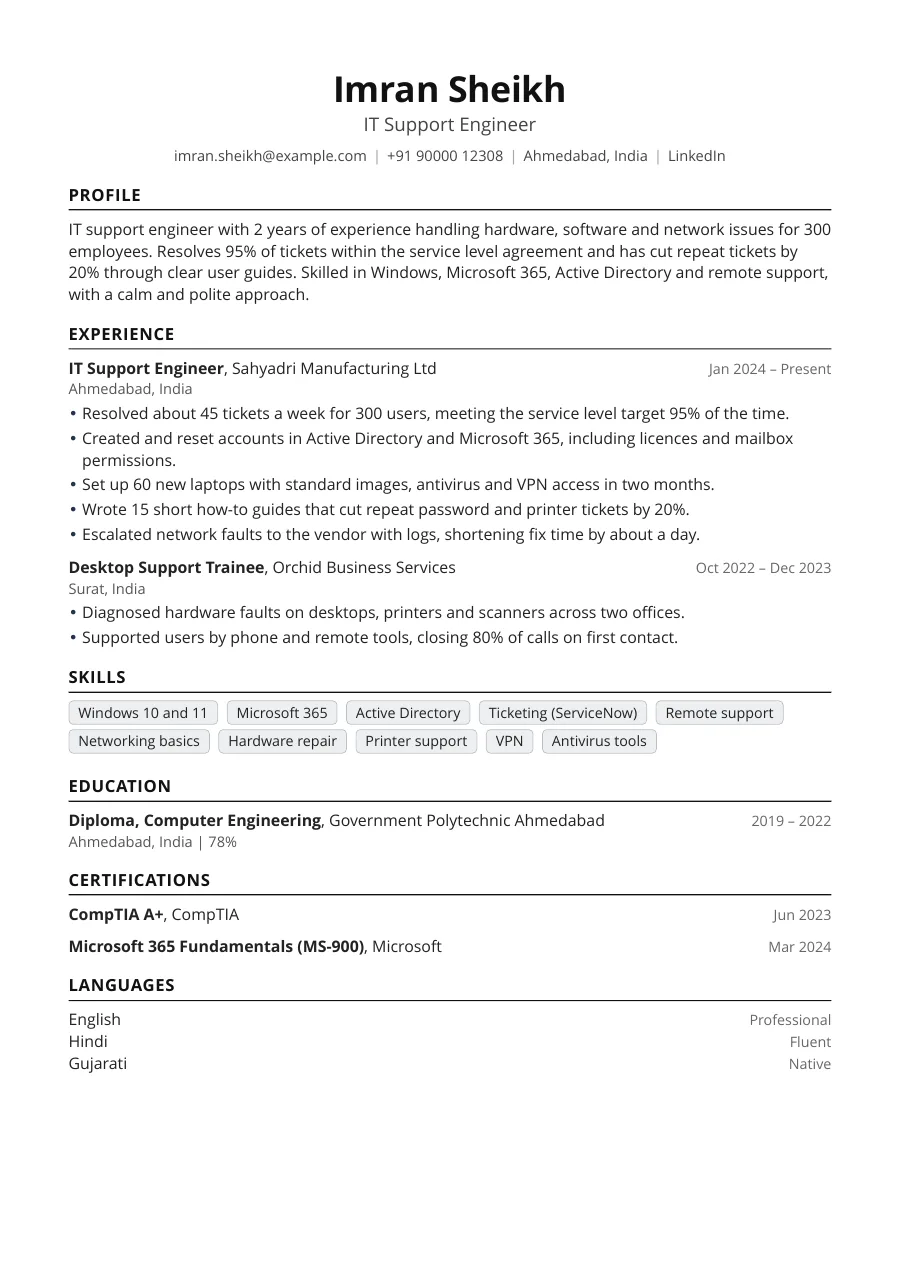
What recruiters look for in IT support
Managers hiring for support roles want people who solve problems calmly and explain them clearly. They check that you know the common systems, such as Windows, Microsoft 365 and Active Directory, and that you can work through a ticket queue without dropping requests. Numbers about volume and speed make your experience easy to judge.
Best section order
- Name, phone, email and city
- Profile of two or three lines
- Skills
- Experience
- Certifications
- Education
Freshers should put education and certifications above experience or projects. See the fresher resume format for a suitable layout.
How to write the summary
Give your years of experience, the size of the user base you support, your main systems and one result. For example: two years supporting 300 users, met the service target on 95% of tickets. Avoid claims such as hardworking or dedicated. The summary generator can help you draft options.
Bullets that show reliability
| Weak | Strong |
|---|---|
| Handled user tickets | Resolved about 45 tickets a week for 300 users, meeting the service target 95% of the time |
| Installed laptops | Set up 60 laptops with standard images, antivirus and VPN in two months |
| Helped users with problems | Wrote 15 how-to guides that cut repeat tickets by 20% |
Useful numbers include tickets per week, users supported, devices managed, first call resolution, satisfaction scores and hours of downtime avoided.
Skills and ATS keywords
Many support roles are filtered by software. Include these terms where they are true for you:
- Systems: Windows 10, Windows 11, macOS, Linux basics, Microsoft 365, Outlook, Teams
- Admin: Active Directory, Group Policy, user provisioning, patching, backup
- Network: TCP/IP, DNS, DHCP, VPN, Wi-Fi, firewalls, switches
- Tools: ServiceNow, Jira Service Management, Freshdesk, remote desktop, TeamViewer
- Skills: troubleshooting, documentation, customer service, SLA, escalation
Run your draft through the ATS resume checker before applying.
Certifications that matter
CompTIA A+ is a widely recognised starting point. Network+ and Security+ come next. Microsoft 365 Fundamentals, Microsoft Azure Fundamentals and ITIL 4 Foundation are common for service desk roles. Cisco CCNA helps if you want to move into networking. List the year and only certifications you hold.
Describing shift work and on-site visits
Many support jobs include shifts or travel between offices. If you have worked nights or weekends, say so in one line, since it shows reliability. Mention the number of sites you covered and your usual response time for urgent issues.
Formatting for a quick read
Support managers often review many resumes in one sitting. Use one column, plain bullets and a readable font, and keep each bullet to two lines. Put your most recent role first and place certifications where they are easy to see. Save the file as a PDF with your name in the title so it is simple to find again later.
India and abroad notes
- India: freshers list diploma or degree marks, and a photo is optional. State your shift flexibility if the posting asks.
- US, UK, Canada: leave out photo and personal details. Add your right to work and any security clearance.
Common mistakes
- Writing only tasks, such as installed software, without results
- Listing skills you cannot demonstrate in a practical round
- Leaving out the size of the environment
- Using a fancy template that parsers cannot read
- Missing certifications you already hold
Browse the resume templates and pick one that is simple and easy to scan.
Skills for a IT Support Engineer resume
Pick the ones that are true for you and that the job ad mentions. In the builder, Skills by job adds them with one tap.
- Windows 10 and 11
- Microsoft 365
- Active Directory
- Troubleshooting
- Hardware repair
- Networking basics
- TCP/IP
- DNS and DHCP
- VPN
- Remote support
- Ticketing systems
- ServiceNow
- Printer support
- Antivirus tools
- Asset management
- Backup and recovery
- Documentation
- Customer service
- Patience
- Communication
- Time management
- Teamwork
IT Support Engineer resume bullet point examples
Use these as a starting point and change the numbers and details to your own. Anything in [brackets] is a placeholder for your real figure.
- Resolved about 45 tickets a week for 300 users while meeting the service level agreement 95% of the time.
- Set up 60 new laptops with standard images, antivirus and VPN access, each ready within 90 minutes.
- Created and reset user accounts in Active Directory and Microsoft 365, including licences, groups and mailbox permissions.
- Wrote 15 short how-to guides for common problems, reducing repeat password and printer tickets by 20%.
- Closed 80% of phone and remote support calls on first contact using remote desktop tools.
- Diagnosed and replaced faulty RAM, hard drives and power supplies on 40 desktops, extending their life by years.
- Kept an accurate asset register of 350 devices, helping the finance team prepare for the yearly audit.
- Configured wired and wireless printers for two floors, ending a month of recurring print queue complaints.
- Handled network faults by checking cables, switches and DNS settings before escalating with clear logs to the provider.
- Restored files from backup for [X users] within the agreed four hour window after accidental deletion.
- Trained [X new employees] on email, VPN and security basics during their onboarding week.
- Applied monthly Windows updates to [X machines] with no unplanned downtime during working hours.
- Maintained a customer satisfaction score of [X out of 5] on post-ticket surveys from users.
- Helped roll out multi-factor authentication to [X users], answering questions and fixing sign-in problems.
Resume summary examples for a IT Support Engineer
IT support engineer with 2 years of experience resolving hardware, software and network issues for a 300 user company. Meets service targets consistently and explains fixes in plain language. Holds CompTIA A+ and Microsoft 365 Fundamentals, keeps accurate records of every fix, and wants to grow into system administration and server support.
Fresher seeking an IT support role where I can apply my diploma in computer engineering and CompTIA A+ training. Practised in installing Windows, assembling PCs and basic networking, with a patient manner, clear spoken English and strong willingness to learn on the job, take feedback and work flexible shifts.
Service desk analyst with 4 years of experience in a managed services setting, handling 60 tickets a week across several clients. Strong in Active Directory, Microsoft 365 and remote support, and looking for a role with more responsibility for servers and networks, including mentoring newer service desk colleagues.
More resume examples
- Cybersecurity Analyst resume
- Data Analyst resume
- Data Scientist resume
- DevOps Engineer resume
- Frontend Developer resume
- QA Tester resume
- Accountant resume
- Architect resume
- All resume examples by profession