What should a Office Administrator resume include?
An office administrator resume should show front desk and records work, scheduling, travel and vendor coordination, MS Office and Google Workspace skills, typing speed, budget or cost handling and any admin certificate. Use numbers like visitors handled, files managed and costs saved. FixDoks gives you a classic layout that is easy for HR to read.
Office Administrator Resume at a glance
| Design | Classic, ATS-friendly |
|---|---|
| Sample | PDF and Word download |
| Examples | 14 bullet points, 22 skills |
| Processing | On our server over HTTPS; files are deleted right after conversion |
| Max file size | 50 MB per file |
| Price | Free to use, no watermark |
| Download | First download free, then ₹49 for 2 months of unlimited downloads (US$3 outside India) |
| Files at once | 1 free, up to 30 with a plan |
| Works on | Chrome, Edge, Safari and Firefox on Windows, Mac, Android and iPhone |
How to use Office Administrator Resume Template
- Click Use this template to open the builder with the Classic design and a Office Administrator section order, or Edit this example to start from the sample.
- Fill in your details. Use Examples and Skills by job for ready-made lines, or the AI writer for your own notes.
- Check the resume score, paste the job ad to see missing keywords, then download your PDF.
Office Administrator resume sample
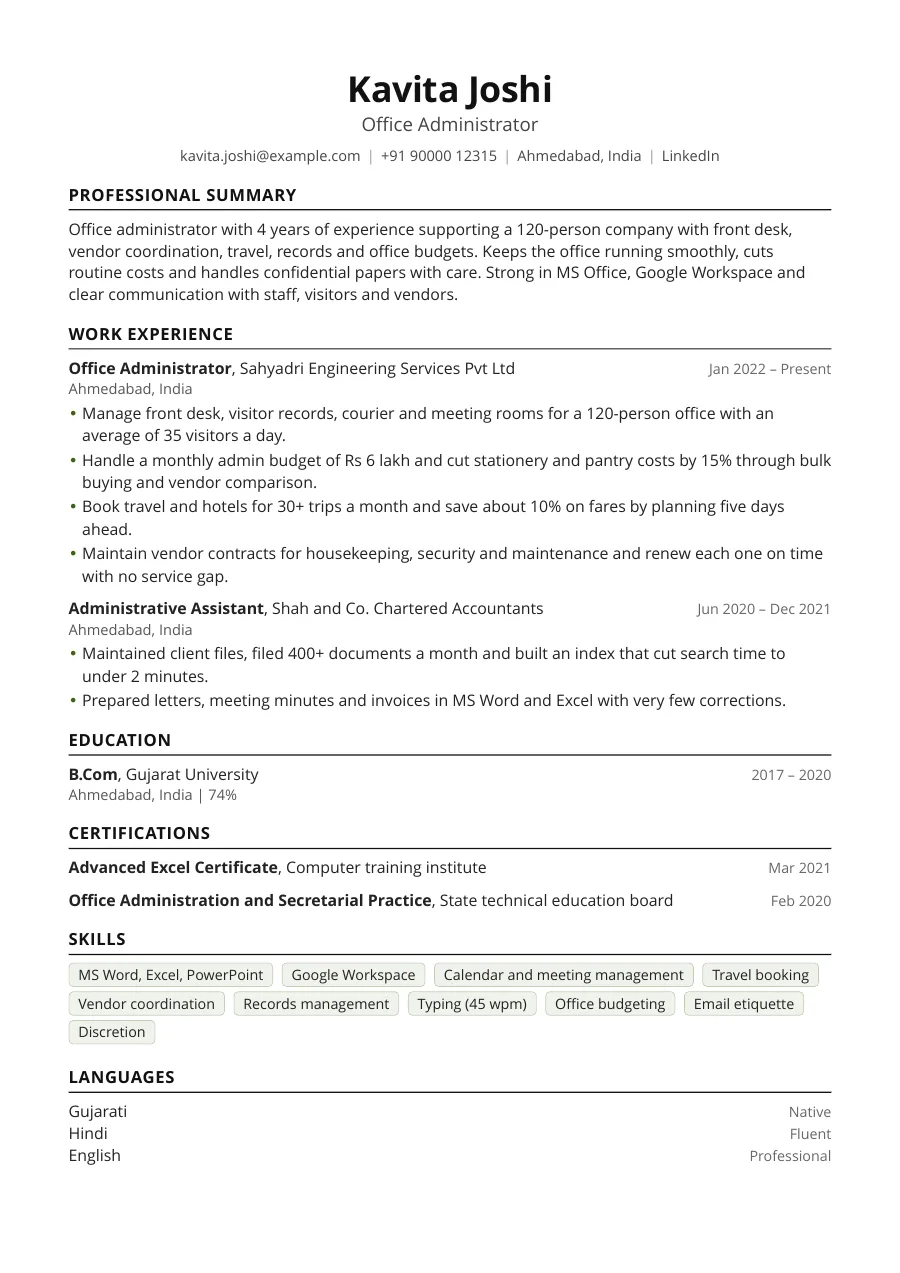
What employers look for in an office administrator resume
Managers hire an office administrator for reliability, organisation and calm communication. They scan for your experience with front desk and visitors, calendars, travel, vendors, records and basic accounts, and for the software you know. They also read your resume as a sample of your work, so neat formatting and correct spelling count.
Best section order
Begin with a short summary, then work experience, education, certifications and skills. Freshers should put education first and add internships, college roles and computer courses. One page is enough for almost every administrator. Keep fonts simple and headings clear so that both HR staff and ATS software can read it.
How to write the summary
State your years of experience, the size of the office, your main duties, your software and one strength such as discretion or cost saving. Avoid vague claims such as hard worker. The resume summary generator can give you drafts to edit.
Strong bullet examples
| Weak | Strong |
|---|---|
| Managed front desk | Managed front desk, visitor records and courier for a 120-person office with 35 visitors on an average day |
| Booked travel | Booked travel for 30+ trips a month and saved about 10% on fares by planning five days ahead |
| Did filing | Filed 400+ documents a month and cut search time to under 2 minutes with a simple index |
The bullet point generator can help you convert daily duties into clear results.
Skills and keywords ATS filters for
- Front desk, reception, visitor management
- Calendar management, meeting coordination, travel booking
- Records management, filing, data entry, documentation
- MS Word, Excel, PowerPoint, Outlook, Google Workspace
- Vendor coordination, office supplies, facility management
- Petty cash, invoice processing, expense reports
- Typing speed, email etiquette, confidentiality
Use the ATS resume checker to see which terms from a job post are missing in your draft.
Qualifications and certifications
Most employers ask for a graduation in any stream, and some accept Class XII with strong skills. Helpful extras include an Advanced Excel course, a typing certificate, an office administration or secretarial practice diploma, and a Tally basics course for roles with accounts. Add the year and the institute. A short first-aid or fire safety training can help in facility-heavy roles.
India versus abroad
In India, a photo and language line are common, and notice period can be mentioned in the application. For the UK, US, Canada or the Gulf, remove the photo and personal details, use terms such as executive assistant or office coordinator, and show your typing and software skills.
Show reliability and discretion
Administrators handle confidential information such as contracts, payroll papers and visitor details. A short line about handling confidential files, balanced petty cash or zero missed renewals tells employers they can trust you. Pair it with a number or a time frame.
Tailor to the type of office
A corporate head office values calendar and travel skills, vendor control and polished communication. A small business values flexibility, basic accounts and handling many tasks at once. A school, hospital or factory office values records, compliance papers and dealing with many people. Read the job post, pick the three duties it repeats and move the matching bullets to the top. Use the same words where they are true for you.
Common mistakes
- Listing tasks without any numbers or outcomes
- Missing MS Office or Google Workspace details
- Typos, uneven spacing and inconsistent dates
- Using decorative templates with icons and boxes
- Writing a long personal profile with hobbies
Make yours with the AI resume builder, and use the fresher format if you are starting out.
Skills for a Office Administrator resume
Pick the ones that are true for you and that the job ad mentions. In the builder, Skills by job adds them with one tap.
- Front desk management
- Visitor management
- Calendar management
- Meeting coordination
- Travel booking
- Vendor management
- Office supplies procurement
- Records management
- Filing and documentation
- Data entry
- Minutes of meeting
- Email correspondence
- Petty cash handling
- Invoice processing
- Facility coordination
- MS Office
- Excel
- Google Workspace
- Typing speed
- Confidentiality
- Organisation
- Communication
Office Administrator resume bullet point examples
Use these as a starting point and change the numbers and details to your own. Anything in [brackets] is a placeholder for your real figure.
- Managed front desk, visitor records, courier and meeting rooms for a 120-person office with 35 visitors on an average day.
- Handled a monthly administration budget of Rs 6 lakh and cut stationery and pantry costs by 15% through bulk buying and vendor comparison.
- Booked travel and hotels for 30+ trips a month and saved about 10% on fares by planning five days ahead.
- Renewed vendor contracts for housekeeping, security and maintenance on time, with no service gap in two years.
- Filed 400+ documents a month and built an index that cut search time for client records to under 2 minutes.
- Prepared letters, meeting minutes and invoices in MS Word and Excel, with very few corrections needed by managers.
- Scheduled meetings and calendars for 5 senior managers and reduced double bookings to zero by using a shared calendar.
- Handled petty cash of Rs 50,000 a month with a daily register and no unexplained differences at month-end audits.
- Welcomed 20 new joiners with ID cards, desks, email and a welcome pack, ready on their first day.
- Created a simple ticket sheet for office requests and closed [X%] of them within one working day.
- Coordinated repairs, pest control and fire safety checks for [X floors], keeping all certificates up to date.
- Organised company events and training sessions for [X attendees], handling venues, catering and travel.
- Digitised [X files] into a shared drive with clear folder names, reducing paper storage by [X%].
- Answered an average of [X calls] a day and directed each caller to the right person, with a polite tone.
Resume summary examples for a Office Administrator
Office administrator with 4 years of experience in front desk, vendors, travel, records and office budgets for a 120-person company. Skilled in MS Office and Google Workspace, discreet with confidential papers and steady in handling daily office needs, from visitors and couriers to vendor visits and monthly reports.
Administrative professional with 8 years of experience supporting senior managers and running office operations. Handles calendars, travel, vendors and budgets with care, and trains junior staff on documentation and good office practice. Reliable, well organised and respected for staying calm when the office is busy.
Commerce graduate with typing speed of 45 words per minute and Advanced Excel training, seeking a junior office administrator role. Completed a three-month office internship covering filing, data entry, letters and visitor handling, and learns quickly. Polite on the phone, careful with documents and punctual every day.
More resume examples
- HR Executive resume
- Lawyer resume
- Operations Manager resume
- Product Manager resume
- Project Manager resume
- Receptionist resume
- Accountant resume
- Architect resume
- All resume examples by profession